
Less rush. More ritual.Creative example
Agentic social media
Do hours of social media management in minutes with AI agents and Autopilot.
AI agents create. You approve. Videmak schedules and publishes. Your social media, finally working together.
Your brand. Your channels. Your final say.
Show it. Make it simple.Creative example
A story worth stopping for.Creative example
24.8KViews
1.2KLikes
86Comments
214Shares
Creative preview · demo engagement
Connect the channels you manage
Less blank page. More possibility.
Make your next scroll-stopping idea happen.
Product stories, creator videos, everyday moments. Bring your idea; give it a format that feels right.
Meet your new daily ritual.Creative example
A story worth stopping for.Creative example
Good mornings start here.Creative example
Less rush. More ritual.Creative example
Show it. Make it simple.Creative example
24.8KViews
1.2KLikes
86Comments
214Shares
How it works
Your website in. A week of content out.
Watch your brand become a batch of videos, posts, and posters. Then review your favorites and give them a place on the calendar.
Start with what makes you, you.
One product link. Plenty of possibilities.
yourbrand.com
Analyze my brandWebsiteProduct notesYour references
Your brand, understood
A little research. A lot more relevant.
Your agents connect the details behind your next ideas.
yourbrand.com100%
Your productEveryday essentials, made simple
Your audiencePeople who want a simpler routine
Your voiceWarm, clear, confidently you
Brand context ready. Let’s make something.
From brief to creative batch
Three short videos. Two fresh posts.
Different angles. The same unmistakable brand.
 Social postMeet your new daily ritual.
 Social postThe little details. The big difference.
A fresh take for your feed
Your next posts, coming together.
Visuals, hooks, and captions. Created around your brief.
MEET YOUR NEW RITUAL. MAKE ROOM FOR THE LITTLE THINGS.GOOD MORNINGS START HERE.
Three drafts. Ready for your voice and your final edit.
Your brand, beautifully framed
From product details to poster designs.
Launches, offers, and brand stories. Pick your direction.
Discover your next favoriteyourbrand.Small moments. Big energy.yourbrand.Your next chapter starts hereyourbrand.Three design directions. Your colors, message, and style.
You have the final say
A little polish. Your stamp of approval.
Keep what feels right. Refine the details before scheduling.
PRODUCT LAUNCHA NEW DAILY RITUAL.yourbrand.
Video & post draftsSocial post draftsyourbrand.Your creative check
Meet your new daily ritual.
Message on brand
Visuals refined
Ready for your channels
Approved for schedulingFrom approved to on the calendar
Your next week, looking good.
Reviewed. Approved. Scheduled for your chosen channels.
Content calendarYour next week
09:00
A new daily ritual
A daily ritualA new daily ritualVideoPostPoster09:00
Meet your new favorite
Meet your new favoriteMeet your new favoritePostPostPoster09:00
Make mornings yours
Your product storyMake mornings yoursVideoPostPoster09:00
The little details
The little detailsThe little detailsPostPostPoster09:00
Make room for more
A fresh startMake room for moreVideoPostPoster5 approved pieces. One organized week.3 social posts. Scheduled and ready.3 posters. A plan for every design.
Illustrative product walkthrough. Review and approval stay in your hands.
A creative team in your workspace
Create the content. Keep the whole picture.
Your creative tools and your publishing tools should talk to each other. Here, they do.
One idea. So many ways to show it.
A product photo today. A story tomorrow. A video for your next launch. Start with a format and let your creativity catch up.
Explore the creative studioKeep the good stuff together.
Your media, product references, and saved captions. Ready for the next draft, without the folder hunt.
Product storyProduct spotlightHow-to videoLearn what deserves an encore.
Follow publishing status and channel performance. Give your next content decision a little more context.
Your content, at a glanceIllustration
Track engagementFind your next idea ↗
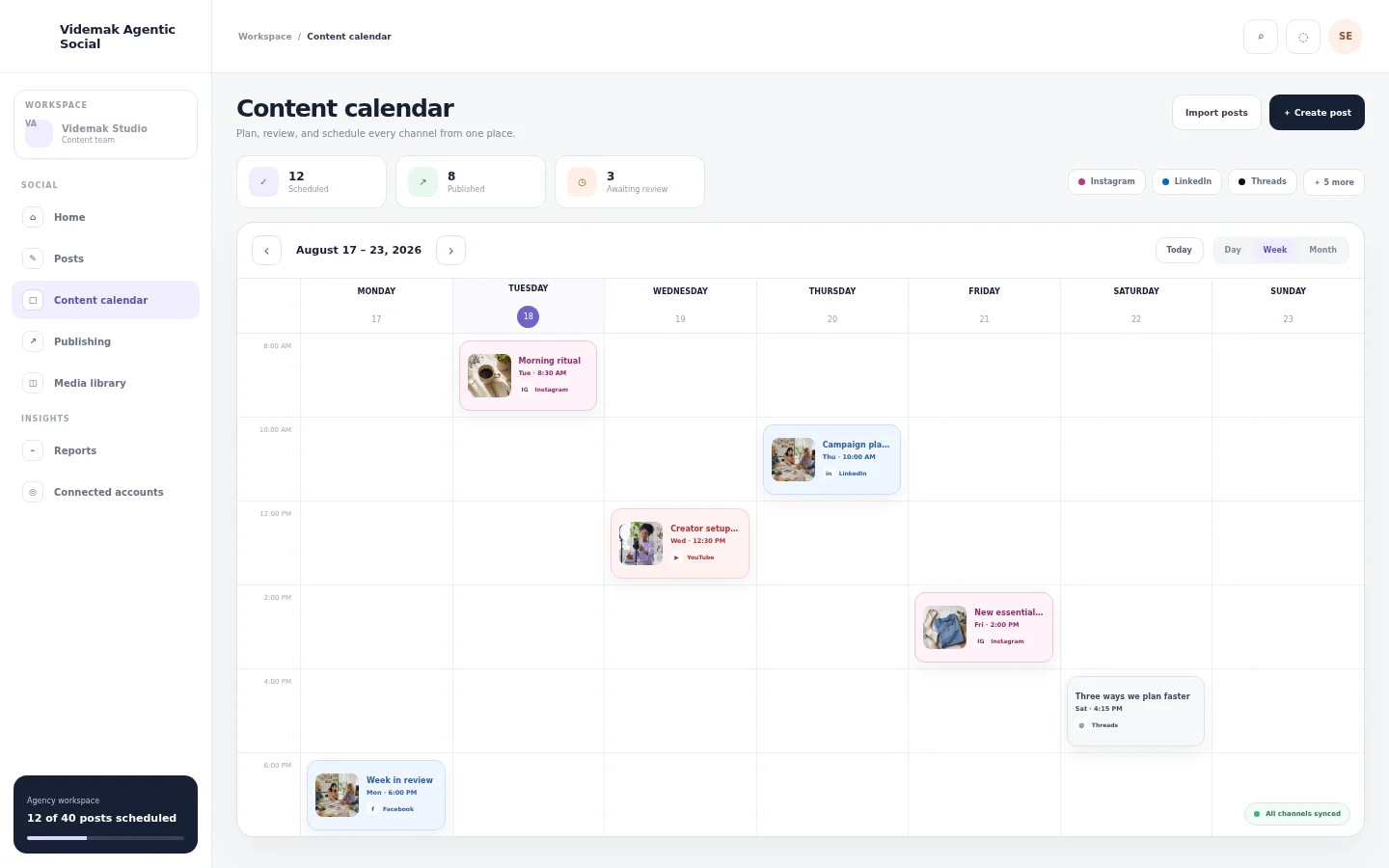
Your calendar. Finally under control.
Give every draft a place to go. See your channels, content, and publishing status together, so the whole team knows what is next.
Plan across your connected channelsReview before you publishKeep every brand in its own space
Meet your new working rhythm
Agents do the busywork. You set the direction.
Research an idea. Shape a campaign. Prepare the next post. Put repeatable tasks on Autopilot and give yourself room to think bigger.
Make room for your next big ideav.Your creative workflowPreview
Understand your productWebsite, audience, and brand context
Find a fresh angleIdeas, hooks, and creative direction
Bring the draft to lifeCopy, visuals, and short videos
Your review comes nextRefine, approve, and choose what goes live
Make it feel like your brand
A new angle for every story.
From a close-up product moment to a creator-led story. Find your direction, then make it your own.
Show it. Make it simple.Creative example
Less rush. More ritual.Creative example
Good mornings start here.Creative example
A story worth stopping for.Creative example
Meet your new daily ritual.Creative example
24.8KViews
1.2KLikes
86Comments
214Shares
A plan for your next stage
Start with your brand. Grow at your pace.
From your first content rhythm to a whole roster of clients. Choose the space and creative power you need.
Standard
Build your publishing rhythm.
$29/month
Billed monthly
Start 7-day free trial- Included Brands1
- UGC Studio
- Influencer Program
- Connected social channels5
- Scheduled posts each monthUnlimited
- AI images each month20
- AI videos each month3
- Media library storage5 GB
- Workspace seats1
- Advanced analytics
Team
Create better, together.
$39/month
Billed monthly
Start 7-day free trial- Included Brands1
- UGC Studio
- Influencer Program
- Connected social channels10
- Scheduled posts each monthUnlimited
- AI images each month100
- AI videos each month10
- Media library storage20 GB
- Workspace seatsUnlimited
- Advanced analytics
Pro
FeaturedMore room for your next big idea.
$49/month
Billed monthly
Start 7-day free trial- Included Brands1
- UGC Studio
- Influencer Program
- Connected social channels30
- Scheduled posts each monthUnlimited
- AI images each month300
- AI videos each month30
- Media library storage50 GB
- Workspace seatsUnlimited
- Advanced analytics
Ultimate
Keep ambitious content moving.
$99/month
Billed monthly
Start 7-day free trial- Included Brands1
- UGC Studio
- Influencer Program
- Connected social channels100
- Scheduled posts each monthUnlimited
- AI images each month500
- AI videos each month60
- Media library storage100 GB
- Workspace seatsUnlimited
- Advanced analytics
Standard
Build your publishing rhythm.
$23/month
$276 billed yearly
Start 7-day free trial- Included Brands1
- UGC Studio
- Influencer Program
- Connected social channels5
- Scheduled posts each monthUnlimited
- AI images each month20
- AI videos each month3
- Media library storage5 GB
- Workspace seats1
- Advanced analytics
Team
Create better, together.
$31/month
$372 billed yearly
Start 7-day free trial- Included Brands1
- UGC Studio
- Influencer Program
- Connected social channels10
- Scheduled posts each monthUnlimited
- AI images each month100
- AI videos each month10
- Media library storage20 GB
- Workspace seatsUnlimited
- Advanced analytics
Pro
FeaturedMore room for your next big idea.
$39/month
$468 billed yearly
Start 7-day free trial- Included Brands1
- UGC Studio
- Influencer Program
- Connected social channels30
- Scheduled posts each monthUnlimited
- AI images each month300
- AI videos each month30
- Media library storage50 GB
- Workspace seatsUnlimited
- Advanced analytics
Ultimate
Keep ambitious content moving.
$79/month
$948 billed yearly
Start 7-day free trial- Included Brands1
- UGC Studio
- Influencer Program
- Connected social channels100
- Scheduled posts each monthUnlimited
- AI images each month500
- AI videos each month60
- Media library storage100 GB
- Workspace seatsUnlimited
- Advanced analytics
Agency
FeaturedBring your clients into one workflow.
$199/month
Billed monthly
Start 7-day free trial- Included Brands10
- UGC Studio
- Influencer Program
- Connected social channels140
- Scheduled posts each monthUnlimited
- AI images each month500
- AI videos each month60
- Media library storage150 GB
- Workspace seats5
- Advanced analytics
Agency Plus
Give every brand room to grow.
$299/month
Billed monthly
Start 7-day free trial- Included Brands20
- UGC Studio
- Influencer Program
- Connected social channels280
- Scheduled posts each monthUnlimited
- AI images each month1,000
- AI videos each month120
- Media library storage300 GB
- Workspace seats5
- Advanced analytics
Agency
FeaturedBring your clients into one workflow.
$161/month
$1,932 billed yearly
Start 7-day free trial- Included Brands10
- UGC Studio
- Influencer Program
- Connected social channels140
- Scheduled posts each monthUnlimited
- AI images each month500
- AI videos each month60
- Media library storage150 GB
- Workspace seats5
- Advanced analytics
Agency Plus
Give every brand room to grow.
$231/month
$2,772 billed yearly
Start 7-day free trial- Included Brands20
- UGC Studio
- Influencer Program
- Connected social channels280
- Scheduled posts each monthUnlimited
- AI images each month1,000
- AI videos each month120
- Media library storage300 GB
- Workspace seats5
- Advanced analytics
Generation credits and service allowances vary by plan. Compare every feature
Before your first post
A few things people ask first.
Start with your product. Find your creative rhythm. Keep control of what your brand puts into the world.
Still have a question? Let’s talk.What is Videmak Agentic Social?
Your social media workspace, with AI agents to help do the work. Videmak brings product research, content creation, scheduling, publishing, and reporting together. Turn a product brief into ideas and drafts, refine what you like, and build a calendar around your brand.
How does it learn my brand?
Add your product website, notes, and reference assets. Videmak can index your product context and use your audience, tone, and creative direction to suggest relevant ideas. Review that brief and update it when your offers or product details change.
What kinds of content can I create?
Create short videos, creator-style content, social posts, posters, stories, product photos, thumbnails, and more. AI tools also help with captions, repurposing, and campaign planning. Available formats and generation limits depend on your plan and connected generation services.
Which platforms can I connect?
The supported channels shown above are currently enabled, including Facebook, X, LinkedIn, Instagram, Pinterest, TikTok, YouTube, Telegram. Available post formats, publishing options, and reporting vary by network and account. Your plan sets your connected-channel allowance.
Can I review everything before it goes live?
Yes. Edit drafts, refine captions and visuals, and choose the content you want to schedule. Check product facts, offers, and claims before publishing. When you enable an automated workflow, you choose its settings and what it is allowed to publish.
Can I get started for free?
Creating your account is free. Choose a plan to begin an available trial and explore its tools. Check the current plans below for trial availability, included features, and usage allowances. Some AI generation services and production tasks have separate credit costs, which are shown before you approve production.
Which plan fits my content schedule?
Choose a business plan for your own brand, or an agency plan for multiple clients. Compare the live prices below by connected channels, brands, team seats, and AI allowances. The full pricing page lists every included feature and billing detail.
Can I use my own product knowledge and creative direction?
Absolutely. Add approved product details, your tone of voice, and your own images or videos. Keep the brief specific: who you are helping, why your product matters, and what someone should do next. You can refine the direction as your campaigns develop.
Will AI content automatically turn into sales?
There is no guaranteed reach or sales result. Videmak helps you create consistently and use available channel reports to decide what to improve. Track visits, signups, and purchases with your website analytics so you can connect content decisions to your business goals.
What is the simplest way to get started?
Create your workspace, add a brand and its product context, then make a small batch of content. Keep your best drafts, connect your channels, and schedule your first week. Build from what works instead of starting from a blank page every day.
Your next chapter starts with one post
Less managing.
More making moves.
Your ideas. Your agents. Your social media, in sync.
Get started freeCreate · Review · Schedule · GrowYour accounts stay in your control
Videmak Agentic Social helps you connect accounts you own or manage, create content, coordinate reviews, schedule publishing, and understand performance.
Google access is optional. Videmak uses Google OAuth for sign-in and connecting a YouTube channel you own or are authorized to manage. Your Google email identifies the connected account. Videmak does not access Gmail or Google Drive through this connection, and does not publish videos or change a channel unless you initiate or schedule that action. Disconnect YouTube in the application or revoke access from your Google Account at any time.
Read our Privacy PolicyTerms of Service